Video Tutorial
One-Key Heal V3
Using Heitu's Super Macro, you can automatically scan the health deficit of raid or party members and intelligently select the appropriate rank of healing spells. No need to manually switch targets — just press one button to complete healing.
Warning
Requires Heitu version >= 1.11.8. If your stable version is below this, please enable Beta push in Heitu settings.
This is just an example. You can read the Heitu Super Macro documentation yourself or have AI read it (provide the URL to the AI), and refine this function according to your needs.
Use Cases
- Quick healing in raids
- Auto-healing party members during group quests
- Emergency healing in PVP
How to Use
If the macro character limit is insufficient, you can place the function in Heitu's Super Macro base library:
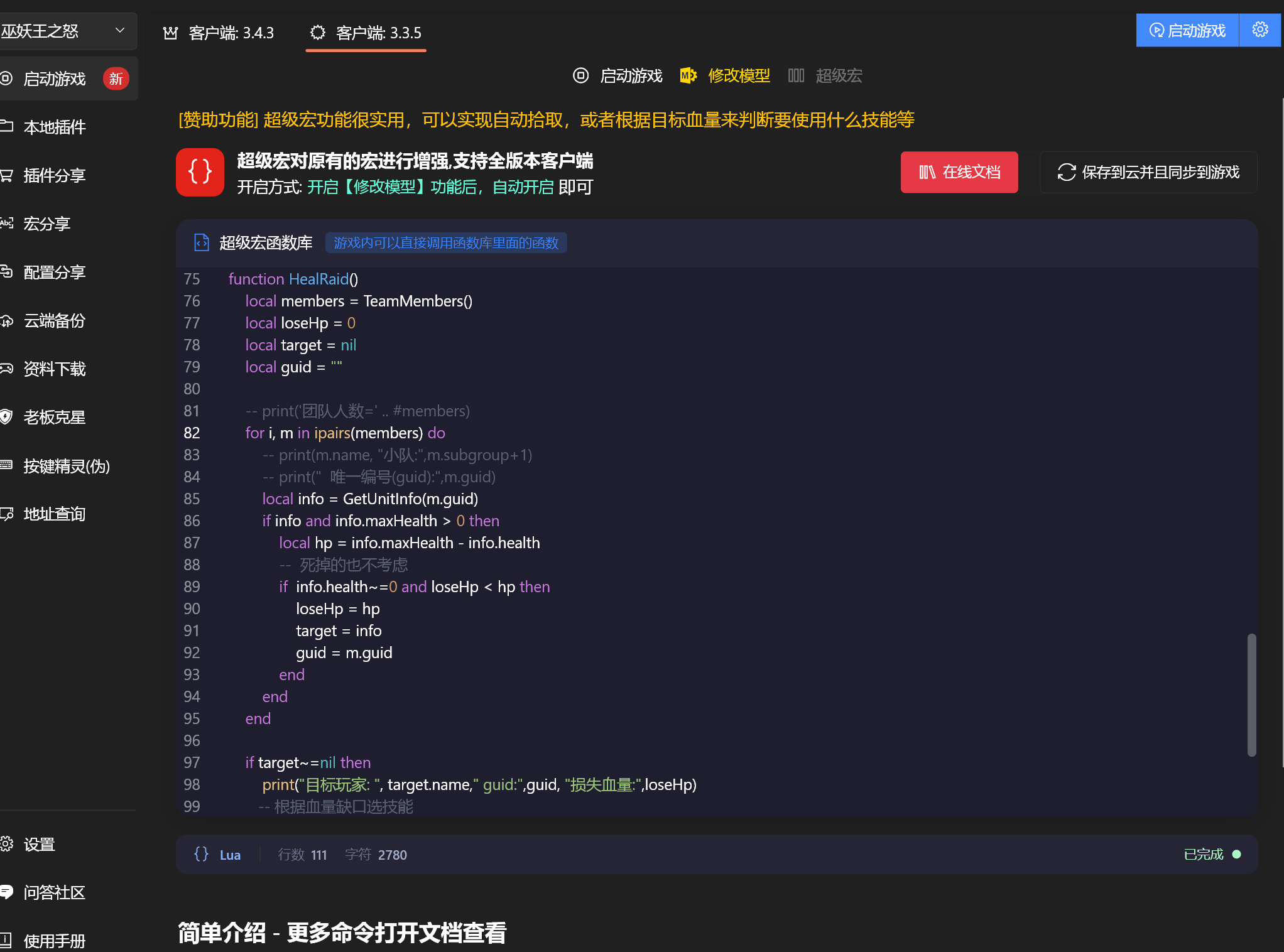
- Open Heitu → Super Macro
- Enter the following function code in the editor
- In-game, use
/s S HealRaid()to invoke it
Or create a new macro in-game with the following content:
/s S HealRaid()Then drag the macro to your action bar and set a keybinding. Press once to automatically heal the raid/party member with the largest health deficit.
Full Code
Enter the following in the Heitu Super Macro editor:
function HealRaid()
    -- ============ Configuration (modify as needed) ============
    -- Whether to heal pets as well (true=enable, false=disable)
    local INCLUDE_PETS = true
    -- Three healing ranks, ordered by priority from highest to lowest
    -- minLost: minimum health deficit   maxDist: maximum cast range (yards)
    -- spellId: spell ID                 name: spell name (for debug output only)
    local LEVELS = {
        {minLost = 5000, maxDist = 40, spellId = 48782, name = "圣光术"},
        {minLost = 2000, maxDist = 40, spellId = 48785, name = "圣光闪现"},
        {minLost = 1,    maxDist = 30, spellId = 48825, name = "神圣震击"},
    }
    -- Note: for ranks with the same health deficit, earlier entries have higher priority
    -- ==========================================

    local members = TeamMembers()

    -- Build scan list (includes members and optionally pets)
    local scanList = {}
    for i, m in ipairs(members) do
        scanList[#scanList + 1] = m
    end
    if INCLUDE_PETS then
        for i, m in ipairs(members) do
            local info = GetUnitInfo(m.guid)
            if info and info.petGuid and info.petGuid ~= 0 then
                scanList[#scanList + 1] = {guid = tostring(info.petGuid)}
            end
        end
    end

    -- Iterate through each healing rank by priority
    for _, lv in ipairs(LEVELS) do
        local bestLost = 0
        local bestInfo = nil
        local bestGuid = ""

        for i, m in ipairs(scanList) do
            local info = GetUnitInfo(m.guid)
            if info and info.health > 0 and info.maxHealth > 0 then
                local lost = info.maxHealth - info.health
                if lost >= lv.minLost then
                    local dist = Distance(m.guid)
                    if dist <= lv.maxDist and lost > bestLost then
                        bestLost = lost
                        bestInfo = info
                        bestGuid = m.guid
                    end
                end
            end
        end

        -- If a valid target is found for the current rank, cast and exit
        if bestInfo ~= nil then
            print("治疗: " .. bestInfo.name .. "[" .. lv.name .. "] 缺口:" .. bestLost .. " 距离:" .. Distance(bestGuid))
            Spell(lv.spellId, bestGuid)
            return
        end
    end

    -- No one needs healing
    print("无需治疗")
end
Then click the [Save and Sync to Game] button in the top right corner of the interface.
How It Works
- Scans through the three healing ranks in priority order
- Within each rank, finds the member with the largest health deficit that is within range
- If a high-priority (urgent) target is found, casts immediately without checking lower ranks
- If no valid target is found across all three ranks, does nothing
flowchart TD
    A[Press hotkey] --> B[Iterate healing ranks by priority]
    B --> C{Current rank: scan party members}
    C --> D[Skip dead/full HP members]
    D --> E[Check health deficit >= rank threshold]
    E -->|Yes| F{Distance <= rank max distance?}
    F -->|Yes| G[Record member with largest health deficit]
    F -->|No| D
    G --> D
    E -->|No| D
    C --> H{Target found for current rank?}
    H -->|Yes| I[Cast corresponding spell]
    H -->|No| J{More ranks remaining?}
    J -->|Yes| C
    J -->|No| K[No healing needed]
Function Reference
| Function | Description |
|---|---|
TeamMembers() | Gets the list of all raid/party members |
GetUnitInfo(guid) | Gets detailed member info via GUID (health, status, etc.) |
Distance(guid) | Gets the distance (in yards) between the specified member and yourself |
Spell(spellId, guid) | Casts a spell on the specified member |
Customization
All adjustable parameters are centralized in the LEVELS configuration table at the beginning of the function. Only modify the configuration section when customizing:
Adjusting Healing Ranks
local LEVELS = {
    -- Adjust minLost (health threshold) and maxDist (cast range)
    {minLost = 8000, maxDist = 40, spellId = majorHealID, name = "Major Heal"},
    {minLost = 4000, maxDist = 35, spellId = mediumHealID, name = "Medium Heal"},
    {minLost = 1,    maxDist = 30, spellId = minorHealID, name = "Minor Heal"},
}
Changing Spells
Replace spellId with your own class's healing spell IDs:
-- Restoration Shaman
{minLost = 5000, maxDist = 40, spellId = healingWaveID,   name = "Healing Wave"}
{minLost = 2000, maxDist = 40, spellId = lesserHealingWaveID, name = "Lesser Healing Wave"}
{minLost = 1,    maxDist = 30, spellId = riptideID,     name = "Riptide"}

-- Restoration Druid
{minLost = 5000, maxDist = 40, spellId = regrowthID,     name = "Regrowth"}
{minLost = 2000, maxDist = 40, spellId = rejuvenationID, name = "Rejuvenation"}
{minLost = 1,    maxDist = 30, spellId = swiftmendID,    name = "Swiftmend"}
Using Health Percentage (Instead of Absolute Health Deficit)
If you prefer using percentage instead of absolute values:
-- Use pct in the condition instead
local pct = (info.health / info.maxHealth) * 100
if pct < 60 and dist <= lv.maxDist then
    -- Heal if HP is below 60%
end
Healing a Specific Party Only
for i, m in ipairs(members) do
    -- Only heal members of party 1 (subgroup starts from 0)
    if m.subgroup == 0 then
        -- ... subsequent logic
    end
end
Enabling/Disabling Pet Healing
When you set INCLUDE_PETS to true in the configuration section, One-Key Heal will also scan the pets of party members and automatically heal injured pets:
local INCLUDE_PETS = true -- Enable pet healingAdding More Ranks
The configuration table supports any number of ranks. Simply add new rows:
local LEVELS = {
    {minLost = 8000, maxDist = 40, spellId = 48782, name = "圣光术"},
    {minLost = 5000, maxDist = 40, spellId = 48785, name = "圣光闪现"},
    {minLost = 2000, maxDist = 35, spellId = 48825, name = "神圣震击"},
    {minLost = 1,    maxDist = 30, spellId = 25235, name = "恢复"},  -- New fourth rank
}
Notes
- You need to enable the Mod Model feature in Heitu first for the Super Macro to take effect automatically
- It is recommended to disable antivirus software or add the Heitu directory to the whitelist
- Spell IDs can be looked up on database websites (e.g., db.heitu.org)
- Supports all 60/70/80 level client versions (112/114/243/253/343)
FAQ
Q1: It doesn't work after following the tutorial
First, upgrade Heitu to the latest version, then check whether the spell IDs in the macro are correct. Do not just copy and use them directly — the spell IDs in the example are for a level 80 Paladin.
Q2: What if I want to use One-Key Heal with multiple classes?
Duplicate the HealRaid function several times, rename them to HealRaid1, HealRaid2, etc., then modify the spell IDs in each function. Use different functions on different characters.